
Gang Sheets Explained (And How They Can Cut Your DTF Transfer Costs by 40%+)
By Little 6 Industries | Last Updated: February 2026 | 16 min read
📋 Table of Contents
- What Is a Gang Sheet?
- How Gang Sheets Save You Money (The Math)
- When Gang Sheets Make Sense (And When They Don’t)
- How Gang Sheet Builders Work (Antigro Example)
- Gang Sheet Best Practices
- Common Gang Sheet Mistakes
- Gang Sheets vs Other DTF Ordering Methods
- Real-World Gang Sheet Use Cases
- How to Order Gang Sheets at Transfers42
- Gang Sheet Cost Calculator
You need 5 different designs for your Etsy shop. Small quantities—maybe 3-5 of each. You go to order DTF transfers and the per-piece pricing makes you wince. $4 per transfer × 20 total pieces = $80. For a small batch test, that’s a hard pill to swallow.
What if you could get all 20 transfers for $45 instead? That’s the power of gang sheets—a printing method that combines multiple designs onto a single sheet, dramatically reducing your per-transfer cost. It’s not magic. It’s just smart use of print space.
In this guide, we’ll break down exactly what gang sheets are, how they work, how much money they actually save you (with real examples), and how to use gang sheet builders like Antigro to organize your designs efficiently. Whether you’re running an Etsy shop, testing new designs, or managing inventory for a small apparel business, understanding gang sheets can transform your printing budget.
What Is a Gang Sheet?
A gang sheet is a single sheet of DTF transfer film with multiple designs printed on it—instead of printing each design individually on separate sheets.
Think of it like this:
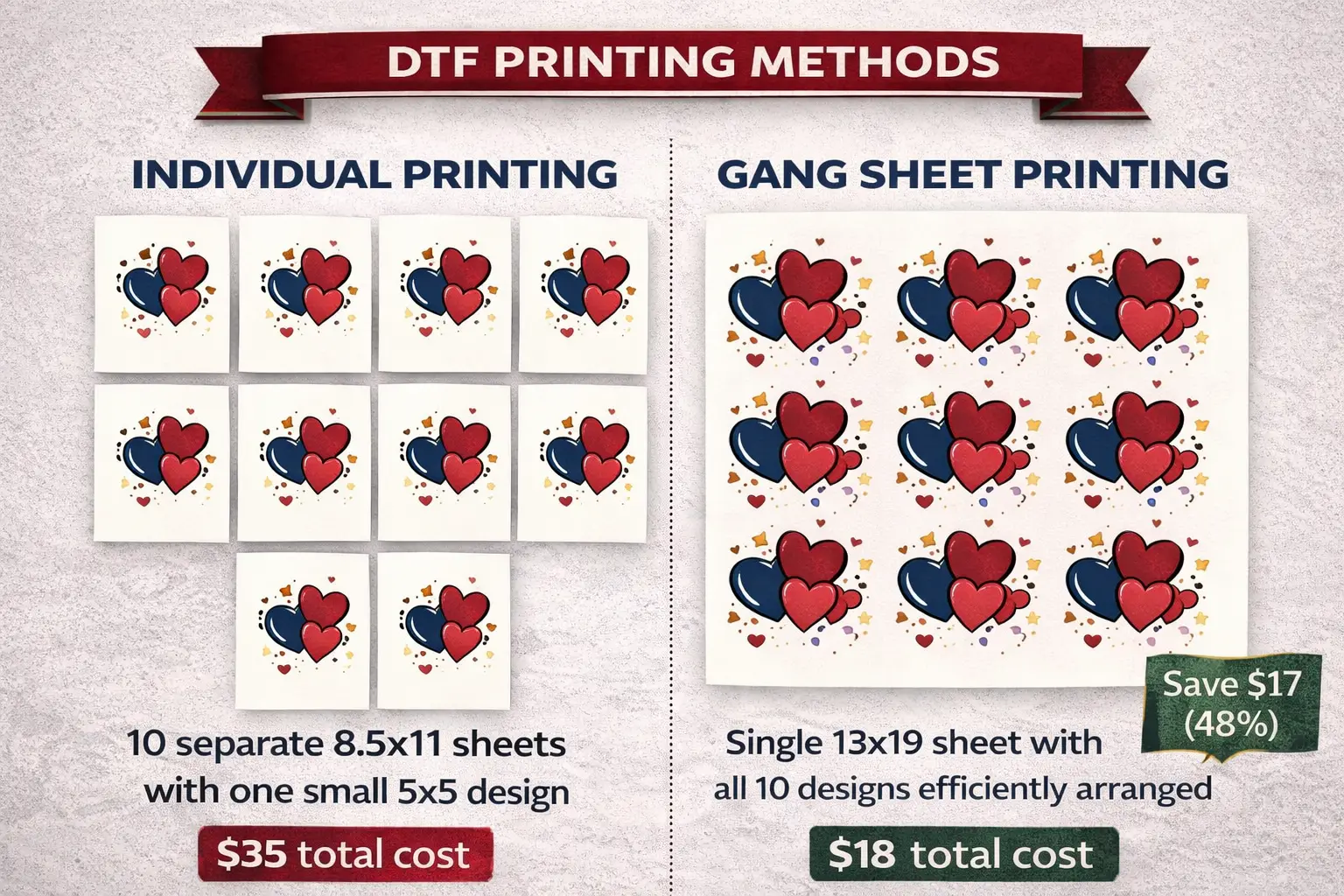
- Individual printing: Each design gets its own 8.5″ × 11″ sheet, even if the design is only 4″ × 4″
- Gang sheet printing: Multiple designs are arranged together on one large sheet (like 22″ × 24″), maximizing the usable space
The Cookie Sheet Analogy
Imagine you’re baking cookies. You wouldn’t bake one cookie per tray and run your oven 20 times. You’d fill the entire cookie sheet and bake them all at once. Gang sheets work the same way—filling the “print space” efficiently to maximize output and minimize waste.
What Goes on a Gang Sheet?
- Multiple different designs (your entire product catalog on one sheet)
- Different quantities of the same design (5 of Design A, 10 of Design B)
- Mix of sizes (small logos, large back prints, pocket-sized designs)
- Combination of orders (if you’re batching customer orders together)
💡 Key Point
You’re paying for the sheet size, not the number of designs. So the more you can efficiently fit on a sheet, the lower your per-transfer cost becomes.
How Gang Sheets Save You Money (The Math)
Let’s look at real examples with actual numbers:
Example 1: Single Design, Multiple Quantities
INDIVIDUAL PRINTING:
- Design: 5″ × 5″ logo
- Quantity needed: 10 transfers
- Individual sheet cost: $3.50 each
- Total cost: $35
GANG SHEET:
- Design: 5″ × 5″ logo (10 copies arranged on one sheet)
- Sheet size needed: 13″ × 19″ gang sheet = $18
- Total cost: $18
Savings: $17 (48% cheaper)
Example 2: Multiple Designs, Mixed Quantities
INDIVIDUAL PRINTING:
- Design A (8″ × 10″): 5 transfers @ $4 each = $20
- Design B (4″ × 4″): 10 transfers @ $2.50 each = $25
- Design C (6″ × 8″): 3 transfers @ $3.50 each = $10.50
- Total cost: $55.50
GANG SHEET:
- All designs arranged on 22″ × 24″ gang sheet = $32
- Total cost: $32
Savings: $23.50 (42% cheaper)
Example 3: Etsy Seller Testing New Designs
INDIVIDUAL PRINTING:
- 8 different designs testing market
- 3 copies each = 24 total transfers
- Individual cost: $3 each average
- Total cost: $72
GANG SHEET:
- 22″ × 60″ gang sheet fits all 24 designs = $45
- Total cost: $45
Savings: $27 (37% cheaper)
The Savings Formula
The more designs you combine, the more you save. Gang sheets work best when:
- You need multiple designs in smaller quantities
- You’re testing new products without massive commitment
- You’re batching customer orders together
- You want to maximize print space efficiency
💰 Real Savings Example
A typical Etsy seller ordering 5-10 transfers per design across 6 designs can save $20-30 per order using gang sheets instead of individual prints. Over a year with monthly orders, that’s $240-360 saved—enough to cover new design development or marketing costs.
When Gang Sheets Make Sense (And When They Don’t)
Gang sheets aren’t always the right solution. Here’s when they work and when they don’t:
✅ Gang Sheets Are Perfect For:
- Testing new designs: Order 2-5 of each design without paying full individual prices for testing
- Small batch production: Etsy sellers, craft fair vendors, small merchandise runs
- Multiple designs in your catalog: Keeping inventory of 5-20 different designs without breaking the bank
- Mixed size orders: Combining small logos, large back prints, and pocket-sized designs on one sheet
- Batching customer orders: If you press for multiple customers, combine their orders on one efficient sheet
❌ Gang Sheets Don’t Make Sense For:
- Large quantities of one design: If you need 100+ of the same design, individual sheets or roll printing might be more efficient
- Single urgent reorder: If you only need 1-2 of a specific design right now and can’t wait
- Very large designs: If your design is 16″ × 20″, it already fills most of a sheet anyway
- Immediate turnaround needed: Gang sheets require slight planning; emergency same-day orders work better individually
The Decision Framework
Choose Gang Sheets If:
- You need 2+ different designs
- Quantities per design are low (under 50 each)
- You’re testing market demand
- Budget efficiency matters more than immediate turnaround
Choose Individual Prints If:
- You need 50+ of the same single design
- It’s a rush reorder of one specific SKU
- Your design already fills an entire sheet
- You need maximum simplicity (one design, done, ship it)
How Gang Sheet Builders Work (Antigro Example)
The Manual Problem
Arranging designs on a gang sheet manually is tedious and error-prone. You need to:
- Calculate spacing between designs
- Maximize space efficiency
- Ensure proper bleed and margins
- Track which designs go where
- Create the file properly formatted for printing
One mistake means wasted print space or designs that cut off at the edges.
The Automated Solution: Gang Sheet Builders
Gang sheet builders like Antigro (available at Transfers42.com) automate this entire process, eliminating the guesswork and manual work.
How Antigro Works
Step 1: Upload Your Designs
- Drag and drop your PNG files (transparent backgrounds work best)
- The system recognizes each design’s dimensions automatically
Step 2: Set Quantities
- Specify how many of each design you need
- System calculates total space required
Step 3: Auto-Arrange
- Antigro automatically arranges your designs to maximize space
- Proper spacing, margins, and bleed built in automatically
- Shows you exactly what the sheet will look like before ordering
Step 4: Choose Sheet Size
- System recommends optimal sheet size based on your designs
- You can see cost per sheet before committing
Step 5: Order
- One-click ordering
- We print exactly what you see in the builder
- Ships in 48-72 hours
Key Features of Good Gang Sheet Builders
- Visual preview: See exactly what you’re getting before you pay
- Automatic spacing: No designs too close together causing print issues
- Size optimization: Recommends most cost-effective sheet size
- Quantity flexibility: Easy to adjust quantities per design on the fly
- File preparation: Handles all technical requirements automatically
Canva Integration
Antigro integrates with Canva, so if you design in Canva, you can pull designs directly into the gang sheet builder. No downloading files, re-uploading, and managing versions. It’s seamless.
🛠️ Try the Antigro Gang Sheet Builder
Available at Transfers42.com
✅ Free to use – only pay when you order
✅ Supports PNG files with transparent backgrounds
✅ Unlimited designs per sheet
Gang Sheet Best Practices
1. Use Transparent Backgrounds (PNG Files)
Gang sheets print designs edge-to-edge. White backgrounds waste valuable space and look unprofessional when pressed. Always save designs as PNG with transparency for the cleanest results.
2. Group by Color Requirements
Full-color designs work well together. White ink designs (for dark fabrics) should be grouped separately. This helps ensure consistent printing quality and proper ink application.
3. Include Extra Copies of Best Sellers
If you know Design A sells better than Design B, include more copies of A on your gang sheet. Better to have extras of your winners than to reorder individually later.
4. Plan for Pressing Workflow
Group similar-sized designs together on the sheet when possible. This makes heat pressing faster since you can use the same settings for nearby designs without constant adjustments.
5. Label Your Sheet
Write or print a simple key showing which design is which—especially helpful if designs look similar or you’re managing multiple orders. A quick sketch with labels saves confusion later.
6. Consider Cutting Difficulty
Intricate designs with lots of fine detail are harder to cut precisely. Leave extra space around complex shapes. Gang sheet builders like Antigro usually handle this automatically, but it’s worth being aware of.
7. Order Slightly More Than You Think
Gang sheets are cost-effective enough to order a few extra copies. It saves you from immediate reorders if you sell out faster than expected or need test presses to dial in settings.
Common Gang Sheet Mistakes (And How to Avoid Them)
MISTAKE #1: Designs Too Close Together
Problem: Designs bleed together during printing, become hard to cut, and look unprofessional.
Fix: Use a gang sheet builder with automatic spacing like Antigro. It calculates proper spacing every time.
MISTAKE #2: Not Leaving Margin Space
Problem: Designs at sheet edges get cut off during production or handling.
Fix: Gang sheet builders automatically add required margins. Manual layouts need minimum 0.5″ margins on all sides.
MISTAKE #3: Mixing White Ink and Full Color
Problem: White ink prints differently than CMYK; mixing causes inconsistent results and potential print failures.
Fix: Keep white ink designs (for dark fabrics) on separate gang sheets from full-color designs.
MISTAKE #4: Overcomplicating the First Order
Problem: Trying to fit 30 designs on one massive sheet to “maximize savings” creates confusion and increases error risk.
Fix: Start with 5-10 designs on your first gang sheet. Get comfortable with the process before scaling up.
MISTAKE #5: Not Keeping a Layout Reference
Problem: Can’t remember which design is which when cutting the sheet, leading to mix-ups.
Fix: Save your gang sheet builder preview screenshot or create a simple numbered diagram for reference.
MISTAKE #6: Ordering Wrong Sheet Size
Problem: Designs don’t fit, or there’s way too much wasted space, killing your cost savings.
Fix: Let your gang sheet builder calculate the optimal size. It does the math so you don’t have to.
Gang Sheets vs Other DTF Ordering Methods
Option 1: Individual Transfers
- Best for: Single design, high quantity (50+ of same design)
- Cost: Higher per-transfer cost
- Convenience: Simplest to order – upload one design, specify quantity, done
- Flexibility: Low (one design per order)
Option 2: Gang Sheets
- Best for: Multiple designs, testing, small batches (2-50 per design)
- Cost: 40%+ savings on mixed orders
- Convenience: Requires slight planning, but builders make it easy
- Flexibility: High (unlimited design combinations possible)
Option 3: Roll Printing
- Best for: Very high quantities (500+) of a single design
- Cost: Lowest per-transfer cost at massive scale
- Convenience: Only practical for large production runs
- Flexibility: Very low (must commit to high quantity upfront)
The Smart Strategy
Use gang sheets for testing product-market fit and maintaining variety in your catalog. Once you identify your best sellers through actual sales data, order larger individual batches or consider roll printing for those specific high-volume designs. Let the market tell you what to scale.
Real-World Gang Sheet Use Cases
Use Case 1: Etsy Shop Owner
Scenario: Selling 10 different funny dad joke shirts, testing which designs resonate
Approach: Gang sheet with 3-5 of each design (40 total transfers)
Result: $45 for all 40 transfers instead of $120 ordering individually
Benefit: Can test entire product line without massive upfront investment, then scale winners
Use Case 2: Small Apparel Brand Launch
Scenario: Launching new collection with 6 core designs
Approach: Gang sheet with 10 of each design (60 total transfers)
Result: Fits on 22″ × 60″ sheet for $65 vs $180 ordering individually
Benefit: Professional product launch without breaking the bank on inventory
Use Case 3: Event Merchandise
Scenario: Company event needs 5 different staff role shirts (Security, Staff, Volunteer, Manager, Vendor)
Approach: Gang sheet with exact quantities per role (varying amounts)
Result: All event shirts printed from one efficient sheet order
Benefit: No minimum quantities forcing overproduction of roles that need fewer shirts
Use Case 4: Print-on-Demand Testing
Scenario: Testing 15 new designs to see what resonates with audience before building inventory
Approach: Gang sheet with 2-3 samples of each design for photography and initial sales
Result: Can photograph all products for online listings affordably
Benefit: Data-driven inventory decisions before committing to large production runs
How to Order Gang Sheets at Transfers42
Step 1: Prepare Your Designs
- Save as PNG files with transparent backgrounds
- Ensure proper resolution (300 DPI recommended for best quality)
- Name files clearly (helps you stay organized during upload)
Step 2: Go to Transfers42.com
- Navigate to the Gang Sheet Builder (Antigro)
- No account required to start designing
Step 3: Upload Your Designs
- Drag and drop PNG files into the builder
- Preview each design as it uploads
Step 4: Set Quantities
- Specify how many of each design you need
- Adjust as needed—nothing is locked in until checkout
Step 5: Review Auto-Layout
- Antigro arranges designs automatically for maximum efficiency
- System shows optimal sheet size and total cost
- Make any final adjustments needed
Step 6: Finalize and Order
- Review total cost and sheet dimensions one final time
- Add to cart and complete checkout
- Standard 48-72 hour production turnaround
Step 7: Receive and Press
- Gang sheet arrives ready to cut and press
- Follow our pressing guide (included with order)
- Cut individual designs as needed and start pressing
💬 Support Available
If you get stuck or have questions, we’re here to help:
📞 Phone: (520) 705-4026
📧 Email: matt@little6llc.com
We’ll walk you through the process step by step if needed.
Gang Sheet Cost Calculator (Quick Reference)
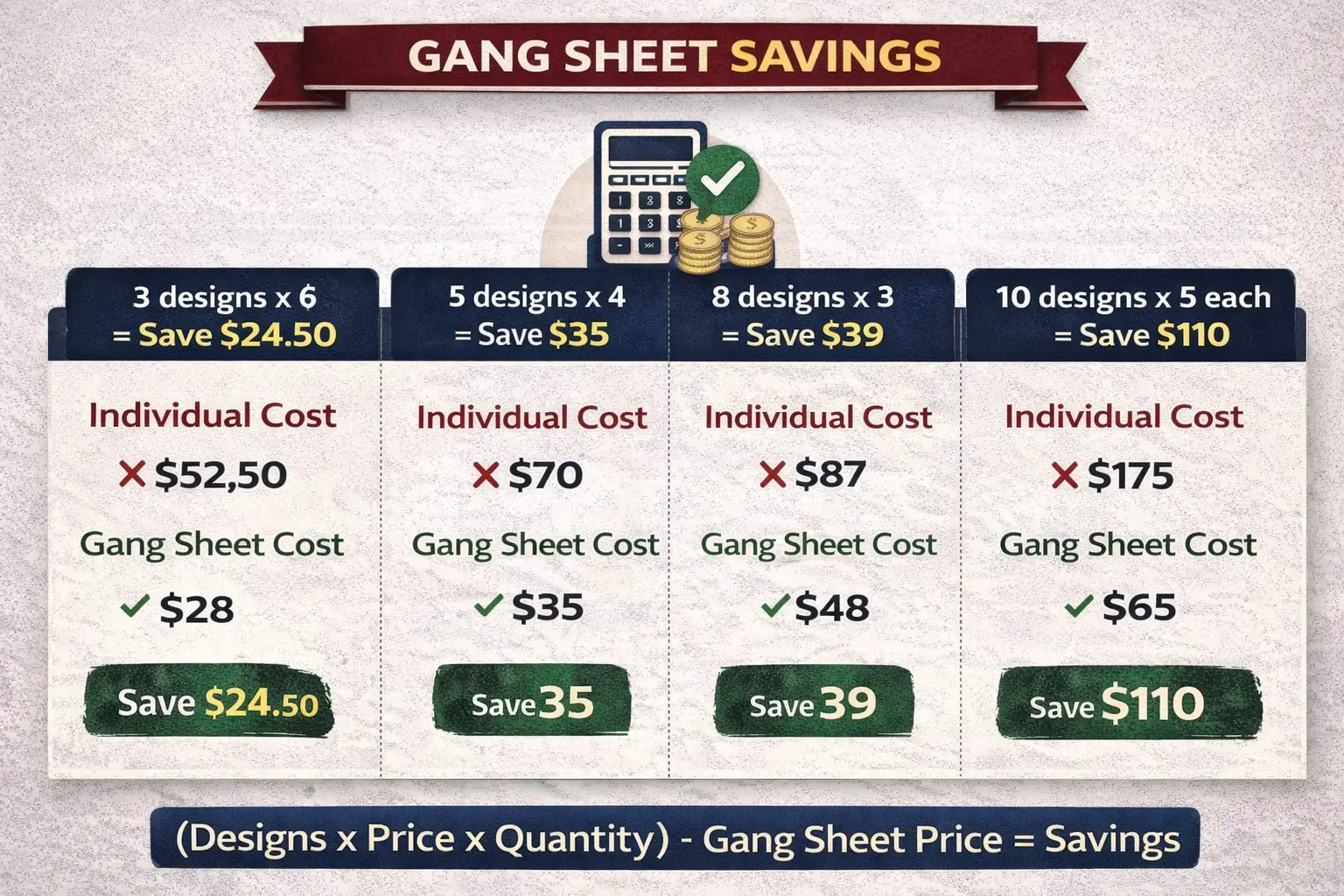
Here’s a quick cost comparison table to help you see potential savings:
| Designs | Qty Each | Total Transfers | Individual Cost* | Gang Sheet Cost | Savings |
|---|---|---|---|---|---|
| 3 | 5 | 15 | $52.50 | $28 | $24.50 |
| 5 | 4 | 20 | $70 | $35 | $35 |
| 8 | 3 | 24 | $84 | $45 | $39 |
| 10 | 5 | 50 | $175 | $65 | $110 |
*Based on average individual transfer cost of $3.50
Calculate Your Potential Savings
Use this formula to estimate your savings:
(Number of designs × Average individual price × Quantity per design) – Gang sheet price = Your savings
Example:
(6 designs × $3.50 × 4 qty) – $35 gang sheet = $84 – $35 = $49 saved
Smart Printing Saves Money
Gang sheets aren’t just about saving money—they’re about making smart business decisions. They let you test designs without massive upfront investment. They let you keep variety in your catalog without breaking the bank. And they let you respond to actual market demand instead of guessing what will sell.
The math is simple: combining multiple designs on a single sheet reduces waste, maximizes print space, and passes those savings directly to you. For Etsy sellers, small apparel brands, and anyone managing a variety of designs, gang sheets are the difference between profitable inventory management and budget-busting guesswork.
At Transfers42, our Antigro gang sheet builder makes the process effortless. No manual layout headaches. No complicated calculations. Just upload your designs, set quantities, and let the system optimize everything for you. What used to take hours now takes minutes—and saves you 40%+ in the process.
Because smart printing isn’t about cutting corners. It’s about cutting costs while maintaining the quality your customers expect.
✅ Your Next Steps
1. Try the Antigro Gang Sheet Builder at Transfers42.com (free to use, no account required)
2. Upload 3-5 designs and see your potential savings calculated automatically
3. Order your first gang sheet and compare the results to individual orders
4. Scale your product testing without scaling your costs
Build Your First Gang Sheet – See Your Savings
🛠️ Free Antigro Gang Sheet Builder at Transfers42.com
💰 Save 40%+ on mixed design orders
📦 48-72 hour production
✅ No minimums, no setup fees
📞 Questions? Call: (520) 705-4026
📧 Email: matt@little6llc.com
📍 In-house production | Veteran-Owned | Maricopa, AZ
Related Articles
#little6 #little6llc #GangSheets #DTFPrinting #SaveMoney #Antigro #Transfers42 #PrintOnDemand #CustomPrinting
About the Author
Little 6 Industries is a Service-Disabled Veteran-Owned Small Business (SDVOSB) based in Maricopa, Arizona. We created the Antigro gang sheet builder at Transfers42.com to make professional DTF printing accessible and affordable for Etsy sellers, small brands, and print-on-demand businesses. Our goal: help you save money while maintaining the quality your customers expect. Visit little6llc.com or start building your gang sheet at Transfers42.com.